In this very short tutorial (just two minutes long) we show how to use "Infinity Curves with Offset" in Maya. Let's say you animate a character taking two steps across the screen, and you want to replicate the action. By using Infinity Curves with Offset, you can replicate the motion automatically, and have the character take as many steps as you like. Once you're done, you can bake your curves, and then edit the shot.

Showing posts with label techniques. Show all posts
Showing posts with label techniques. Show all posts
Wednesday, 28 February 2024

Sunday, 10 April 2022
Why Lipsync Should be "Two Frames Ahead"
 |
| Cliff Nordberg |
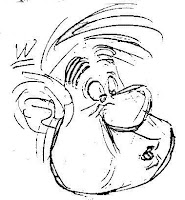
For your audience to be able to read the lip sync clearly you'll want to offset the jaw opening at least two frames before the audio is actually heard.
If you have the jaw opening and closing exactly on the frame that the audio is heard, your lip sync will feel slightly "off sync", ie a little late.
Tuesday, 8 February 2022
How to Simulate Weight in Animation
 |
| Weight lift from the Animator's Survival Kit |
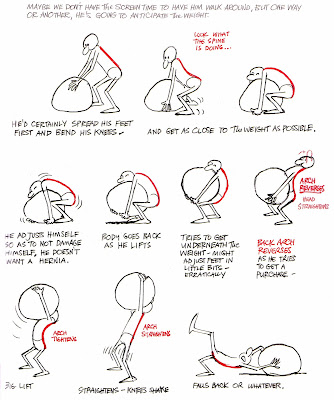
One of the more tricky exercises our students at BNU have to tackle is to animate a character lifting a heavy object, such as a box. The box is just a bunch of pixels - it has no weight. So the challenge is to make it appear heavy.
To get started, take a look at the thumbnail sketches on the left, taken from the book we recommend all our students buy - The Animator's Survival Kit.
The thumbnails show how important it is for the character to get their feet right underneath the object they are going to lift. That way, the weight of the object falls directly over the character's heels - and the object feels heavy.
Monday, 1 November 2021
Stanislavski's Questions for Actors & Animators
 |
| Constantin Stanislavski |
Many actors credit him with inventing "the Method" - the means by which actors immerse themselves in a character.
Animators are actors with a pencil or a mouse, and we need to give a performance that is just as credible as anything that a stage or screen actor will create.
So, what can animators learn from Stanislavski's seven questions for actors?
Saturday, 21 August 2021
How to Achieve Snappy Animation Timing

Even timing and spacing produces soft, floaty animation, lacks definition and feels mushy. This is particularly the case when the animation is based on live action reference. Reference, if followed too closely, can end up feeling floaty and weightless.
The solution to this problem is to tighten up your key poses, and spend more time in the key poses, rather than transitioning slowly from one pose to another. Animators call this approach "snappy timing", or "tightening up the poses". Your goal is to make the motion feel dynamic and crisp.
Friday, 12 June 2020
What Does an Animation Editor Do, Exactly?
 |
| Movieola |
Making an animated film is a collaborative effort and is almost always completed with a team of people; the editor is one of the key creative roles on any production.
We encourage all our students at Bucks to try their hand at film editing, it's an important job and one of the most interesting seats to occupy on any production.
Wednesday, 22 April 2020
Six Tips to Make Maya Run Faster
 |
| Tip Number 6 - stay low poly |
Or, not quite as drastic but almost as frustrating, their scene becomes so slow that animation becomes a burden. Fortunately, there are a number of ways to speed up your scene and make it run faster. Below are our Six Tips to make Maya work at optimal speed.
Sunday, 5 April 2020
How to Animate "Eye Darts"
 |
| Eyes - Window to the Soul |
Our eyes are very expressive, and the eyes are what we look at when we watch a character on the screen. When we talk, we seek signals for how another person is thinking and feeling - we watch their eyes, and we often dart from one eye to another. So, how does an animator animate eye darts?
Friday, 20 March 2020
Anchor Transform Tool Stops Feet Sliding
 |
| Anchor Transform by Robert Joosten stops feet sliding |
Sliding feet can be a problem when animating a character walk or a walk cycle. Fortunately for Maya animators, Robert Joosten’s Anchor Transform Maya plugin offers animators a simple solution.
Rather than manually tweaking your animation to stop the feet sliding, rigger Robert Joosten has develped a free script that lets you anchor a transform for any given time range in your animation.
Thursday, 4 April 2019
How to Plan a Dialogue Shot
 |
But how do you get started with dialogue animation? One of the most common problems encountered by student animators is how to block out a shot from scratch, starting with nothing but a blank screen and a line of dialogue. How do you begin?
After all, in animation you get nothing for free. You start off with a digital puppet, usually in a stiff "T-pose", and have to figure out the rest yourself.
Monday, 25 March 2019
Twelve Top Tips for Animating in Maya

Directors want quality, Producers want speed. To survive in the industry for long, you must please both. Animation producers like animators who do the job well, finish on time, and are nice to work with. If you have all three of these qualities then you will have a long and successful career in the industry.
Below are our Twelve Top Tips for animating in Maya, to help you be both good, fast and reliable. Most of the principles below are things that I learned from the lead animators on "Robots"; the film where I first learned 3D animation in Maya.
Thursday, 22 February 2018
This Rig Goes to Eleven

Eleven is one of the most popular rigs used by our students, and can be used for some great character animation. It's also a very good rig for lipsync, body poses, and facial expressions, and is dependable and easy to learn.
Eleven does, however, have a few quirks. So, what are they and how can we navigate around them?
Sunday, 28 January 2018
50 Ways to Sit by Kevin Parry
50 Ways to Sit by Kevin Parry follows on from 100 Ways to Walk, an inventive and clever imagining on the many different ways in which people move, and what this tells us about their character and personality. 50 Ways to Sit takes the same idea, and shows how much variation there in the way that different people might carry out a normal, simple action, like sitting down. It also shows how important it is for animators to get used to acting out their shots, filming themselves, and then using the footage as reference for their work. It's one of the most important, and least well understood, parts of the animation process.
Subscribe to:
Posts (Atom)